
Autopilot Guidance: Your Digital Co-Pilot
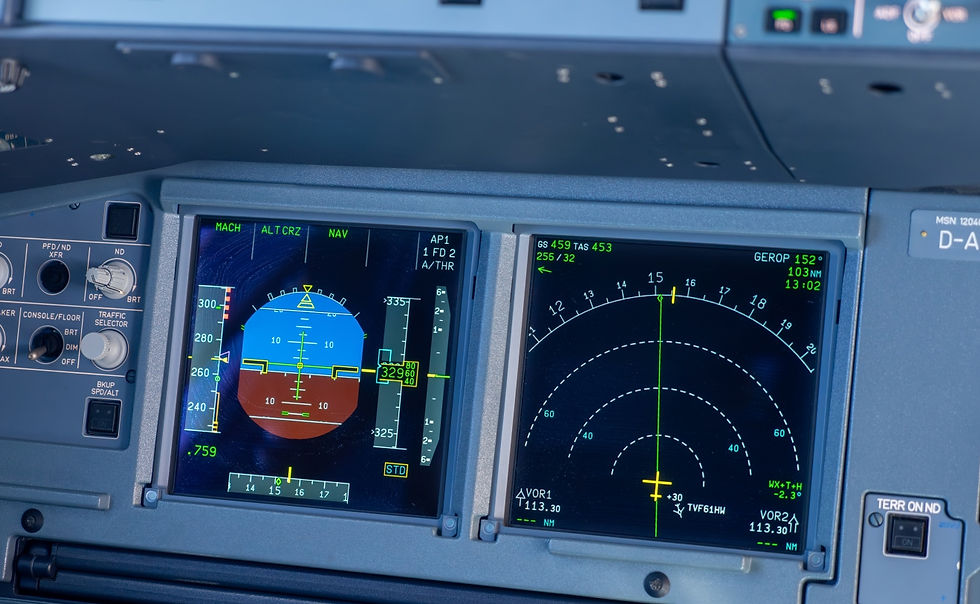
Every flight begins with a simple question: How will the aircraft get from point A to point B safely and efficiently? The autopilot guidance system in the A320/A321 answers this question by providing three interconnected functions that work together like a highly skilled flight crew. Understanding how these systems think and operate transforms you from someone who simply pushes buttons to a pilot who truly commands the aircraft.
The Three Pillars of Flight Guidance
Think of your flight guidance system as having three distinct but interconnected roles, much like a well-coordinated flight crew. The Flight Director (FD) acts as your instructor, showing you exactly where to point the aircraft through visual cues on your Primary Flight Display (PFD). The Autopilot (AP) serves as your reliable co-pilot, automatically following those instructions with precision. The Autothrust (A/THR) system manages your engines like an experienced flight engineer, constantly adjusting power to maintain your desired speed or thrust setting.
These three systems never work in isolation. When you engage the autopilot, it immediately follows whatever guidance the flight director was providing. When you change altitude or heading, the autothrust system automatically adjusts to maintain your target speed. This coordination means understanding one system requires understanding how it interacts with the others.
How Your Aircraft Thinks: Managed vs Selected Modes
Your A320/A321 operates in two fundamentally different ways of thinking about flight. In managed modes, the aircraft follows a pre-programmed plan stored in the Flight Management System (FMS), much like following a detailed GPS route in your car. The system knows where you're going, how fast you should get there, and what altitude to maintain. It makes decisions based on your entered flight plan, automatically adjusting for wind, weight, and performance optimization.
In selected modes, you become the decision-maker, directly commanding the aircraft through the Flight Control Unit (FCU). You tell it to fly a specific heading, maintain a particular altitude, or climb at a certain rate. The aircraft follows your commands precisely, but doesn't anticipate what comes next—that’s your job.
The key insight is knowing when to use each mode. Managed modes excel during normal operations when following your planned route, allowing the system to optimize performance and anticipate upcoming requirements. Selected modes become essential when air traffic control gives you vectors, when weather requires deviations, or when you need immediate, direct control of the aircraft's path.
Lateral Guidance: Controlling Your Horizontal Path
Your aircraft's lateral guidance manages where you're going horizontally. It operates through several distinct modes that activate based on flight phase and conditions. During takeoff, RWY mode keeps you aligned with the runway centerline using the localizer signal, automatically transitioning to NAV or RWY TRK mode at 30 ft to maintain your target flight path. This seamless transition ensures you don't drift off course during the critical initial climb phase.
For normal navigation, NAV mode follows your programmed flight plan, automatically turning at waypoints and following airways. When air traffic control gives you a heading, HDG/TRK mode flies that specific direction until you select a different mode or re-engage navigation. The system always shows you what it's doing through the Flight Mode Annunciator (FMA), and understanding these displays helps you stay ahead of the aircraft.
During approaches, lateral guidance becomes more sophisticated. LOC mode captures and tracks the localizer beam for precision approaches, while F-LOC mode provides similar guidance for non-precision approaches using the FMS Landing System (FLS). The aircraft can even handle back-course approaches through LOC B/C mode, automatically reversing the guidance logic to account for the reversed localizer signal.
Vertical Guidance: Managing Your Altitude Profile
Vertical guidance controls your altitude and climb/descent profile, operating through modes that change based on flight phase and pilot selection. During takeoff, SRS (Speed Reference System) mode maintains your target speeds—V2 - V2+10 (dual engine operation) after liftoff—while providing essential protections. It limits your pitch angle to prevent excessive nose-up attitudes and ensures a minimum climb rate of 120 ft/min, even in challenging conditions.
For normal climb and descent, you choose between managed modes that follow your flight plan's vertical profile and open modes that climb or descend directly to your selected altitude. CLB mode follows the computed climb path, respecting altitude constraints and speed limits programmed in your flight plan. OP CLB mode ignores these constraints and climbs directly to your target altitude—useful when air traffic control clears you to an altitude different from your planned profile.
The system's intelligence shows in how it handles altitude constraints. When you're cleared to descend early but have an altitude restriction ahead, the aircraft will level off automatically in managed mode to meet that constraint, then continue the descent. This prevents you from violating clearances while maintaining efficient flight path management.
Speed and Thrust Management Integration
Understanding how speed and thrust work together reveals the system's sophisticated logic. The autothrust system operates in two primary modes: SPEED mode maintains your target airspeed by adjusting thrust, while THRUST mode holds a fixed thrust setting and lets speed vary within acceptable limits.
During climb, autothrust typically operates in THRUST mode, commanding climb power while the autopilot adjusts pitch to maintain your target speed. During descent, it often switches to SPEED mode, using idle thrust while the autopilot controls pitch to maintain your selected speed. This coordination ensures efficient engine operation while maintaining precise speed control.
The system includes important protections that activate automatically. Alpha Floor protection commands maximum thrust if your angle of attack becomes dangerously high, overriding any other thrust setting. This protection remains active throughout flight, from lift-off until 100 ft radar altitude during approach, providing a critical safety net during unexpected situations like windshear or inadvertent stalls.
Approach and Landing Guidance
Approach guidance represents the most sophisticated aspect of the autopilot system, capable of flying precision approaches down to category III minimums. The system distinguishes between different approach types and automatically configures the appropriate guidance modes. For example, on ILS approaches, LOC and G/S modes provide lateral and vertical guidance, respectively, capturing and tracking the localizer and glideslope beams.
For non-precision approaches, the FMS Landing System (FLS), for example, creates a virtual glideslope based on the approach procedure in your navigation database. This allows the aircraft to fly stabilized approaches even when no electronic glideslope exists, computing the proper descent angle to arrive at the runway threshold at the correct height.
The system's approach capabilities depend on aircraft configuration and system status. CAT III DUAL capability requires both autopilots engaged and all systems operational, providing fail-operational performance that can complete the landing even after a system failure. Understanding these capabilities helps you plan approaches appropriately and recognize when system degradation affects your operational limits.
Operational Integration and Decision Making
The true power of understanding autopilot guidance lies in knowing how to integrate these systems into your decision-making process. The flight mode annunciator becomes your primary tool for monitoring system behavior, showing not just what modes are active, but what the aircraft plans to do next through armed modes displayed with asterisks.
When the aircraft doesn't behave as expected, the solution often lies in understanding the mode logic rather than fighting the system. If the aircraft isn't following your flight plan, check whether NAV mode is engaged and whether a discontinuity exists in the flight plan. If altitude capture seems delayed, verify that the correct altitude is set and that no conflicting modes are active.
The system provides multiple ways to accomplish the same task, and choosing the right method depends on the situation. Direct-to navigation works well for simple course changes, while flight plan modifications serve better for complex reroutes. Selected modes provide immediate control when you need to deviate from the plan, while managed modes optimize performance when following standard procedures.
Understanding autopilot guidance transforms your relationship with the aircraft from reactive to proactive. Instead of responding to what the system does, you anticipate its behavior and make decisions that work with its logic. This partnership between human judgment and automated precision creates the foundation for safe, efficient flight operations in modern aviation.
The A320/A321 autopilot guidance system represents decades of aviation experience translated into software logic. By understanding its principles rather than memorizing its procedures, you develop the insight needed to use these systems effectively in any situation, making you not just a better pilot but a more confident commander of one of aviation's most sophisticated aircraft.
Autopilot Guidance: Your Digital Co-Pilot
A320 autopilot guidance explained for pilots – managed vs. selected modes, lateral and vertical logic, and how to anticipate system behavior in any phase.
9/15/25, 9:45 AM